.png)
What’s New – December 2025
Bringg end of year updates focus on routing, planning, and dispatching workflows, improving how teams operate on a daily basis.
Clearer optimization application with simultaneous updates
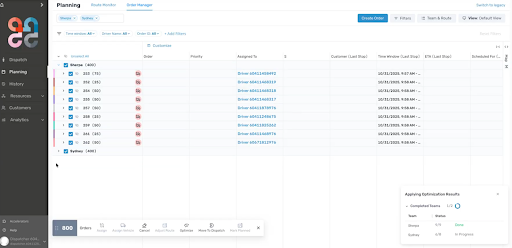
The process of applying optimization results has been improved to make it easier to understand and follow, especially when working with large teams.
Optimization results are now applied in parallel across routes, instead of being applied one route at a time. Routes, orders, and task updates are handled together, so changes appear more consistently in the UI.
A progress indicator shows when results are being applied, helping users understand what is happening and when the process is complete. Route names remain visible even when some assignments are missing, allowing the flow to continue without blocking.
These changes improve the experience of applying optimization results during large planning runs.
Address and geocoding fixing improvements
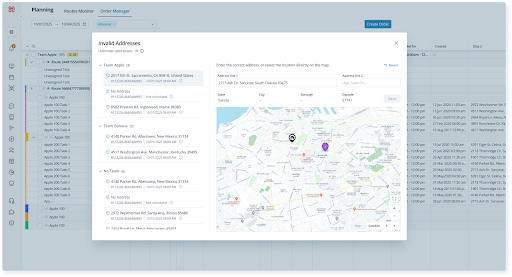
To help users review and resolve geocoding issues, orders with address or location problems are now visible even when they are not assigned to a team, ensuring no relevant orders are missed. Address and geocoding updates are handled in a dedicated experience, where users can update the address or place a pin on the map to correct the location.
Dispatch & Planning v2 updates
Updates across Dispatch & Planning v2 focus on improving scale, visibility, and day-to-day usability for teams managing complex operations.
working with large numbers of teams
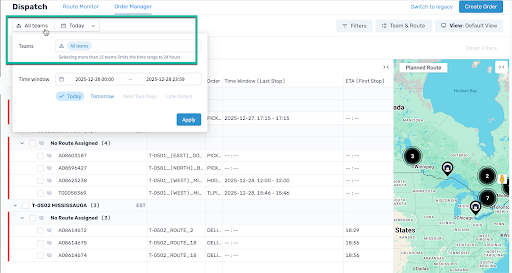
Dispatchers can select more than 15 teams—or all teams, if needed.
When more than 15 teams are selected, the time range must be 24 hours or less. This allows dispatchers to work across many teams at once. For multi-day time ranges, existing team limit still apply. All behavior is controlled by feature flags.
This enhancement removes a key limitation for customers managing large or cross-regional team structures.
time zone visibility
Time zone information is now shown more clearly across DPv2 to support multi-region planning and execution:
team time zones
Team time zones are now visible at the aggregation level. Time zones are displayed using the standard three-letter format (for example, PST, EST, or UTC).
This information is available across DPv2, the Order Page, and soon on the Driver App, making it easier to see when team and destination time zones differ.
order-level waypoint time zones
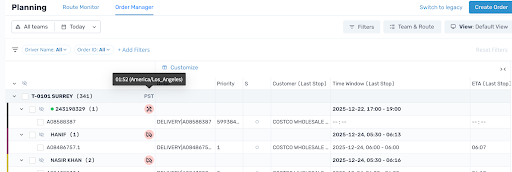
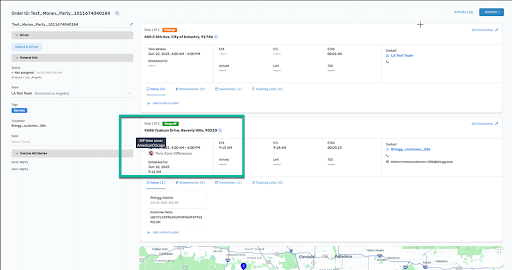
When an order’s waypoint time zone is different from the assigned team’s time zone, it is shown in a new column in the Details section of Order Manage and Routes Monitor.
The time zone is displayed using a standard three-letter format (for example, PST or UTC), together with the time difference relative to the team’s time zone.
planning status visibility
The Done Planning indicator has been expanded across DPv2. A Done Planning column is now available at the order level in all views.
The indicator also appears consistently across Route, Order, Team, and Driver views.
This makes it easier to distinguish between finalized orders and newly added orders, especially when working through multiple planning or optimization cycles.For more information on each enhancement mentioned above, contact your representative.
For more information on each enhancement mentioned above, contact support or your CS representative.
Route adherence operational insights
The Route Adherence Report is our next step after the Route Adherence dashboard, designed to enable deeper, route-level \ driver level analysis that the dashboard alone cannot provide. While the dashboard highlights overall adherence trends, this report allows users to drill into individual routes to see every change made, assess the impact of each adjustment, and understand who performed it. By exposing raw data across planned, modified, and executed routes, the report enables operations and analytics teams to evaluate adherence to optimization logic at a granular level and identify the root causes behind performance deviations.
.png)
Time-aware optimization insights for dynamic delivery slots
Visibility into future delivery risks has been improved for customers using Dynamic Delivery Slots. Optimization alerts and the simulator now surface the scheduled delivery date, support date-based filtering, and expose background availability optimizations directly in context.
Deep linking from alerts to the most relevant optimization and automation context helps dispatchers prioritize critical dates and take focused action.
Vehicles page improvements
The Vehicles page now provides a single, aggregated view for managing vehicles. Vehicles can be viewed across teams, with support for filters, table columns, and bulk actions.
The Add Vehicle flow now includes a team selector and shows related vehicles. The Vehicles page can be accessed from Resources > Vehicles or Team > Team Name > Vehicles.
Post-delivery tipping support
A post_delivery_tip can now be added via the Update Order API within 24 hours of order completion, allowing customers to tip based on the completed delivery experience. Tip information is stored on the order, included in reports, and, when applicable, shared with Uber for third-party–fulfilled orders. This expands post-delivery engagement and enables clearer visibility into driver tipping activity.
The carrier integrations network has been expanded, providing access to more third-party carriers and additional delivery options. For more information, contact your Bringg representative.