Here is everything you need to know about the Autumn 2025 releases. To receive email updates each time we publish updates about new Features and Capabilities, please click “Follow” at the top of our What’s New and Release Notes pages.
optimizing planning & setup
These updates strengthen the upstream foundations that shape cost accuracy, schedule integrity, and workflow consistency across complex fulfillment operations.
streamlined relay creation workflow
Relay is now available to streamline long-distance and remote deliveries by handing off orders between drivers at relay stops. When a relay stop is added, the original linked Pickup and Dropoff are split into two linked legs, while ensuring each leg is executed by the same driver on the same route - and users can pick the relay location from any parking location. Rescheduling an order updates the dates for all relay legs, and canceling any single leg will automatically cancel the others. If delivery fails, items are returned to the route end location and, when configured, the next delivery attempt is created based on the inventory location.
.jpg)
slot fees support for delivery slots
Bringg now supports slot-level fees within Delivery Slots, enabling merchants to define and return a fee per delivery slot through the Quote API. Fees can be configured in the UI or via API and surface accurately in Get_Quote responses. This enhancement completes the move toward Bringg-managed slot availability while preserving merchant ownership of pricing logic.
This allows retailers to reflect true costs in real time, helping improve accuracy at checkout and ensuring end customers always see the correct fee.
Coming early 2026. Can’t wait? Early enablement options are available upon request. Contact Support or your CS representative to get started today.
bulk blackout management via CSV
Managing complex or recurring blackout scenarios is now faster and significantly more scalable. Teams can upload a predefined CSV file to create, update, or delete multiple blackouts in bulk, eliminating repetitive manual steps. This ensures blackout definitions stay aligned with external scheduling systems—critical for customers managing event-based calendars such as sports or entertainment seasons or weather events.
In practice, this means teams can update entire regional blackout calendars in minutes instead of hours, reducing configuration drift during busy cycles.
Coming early 2026. Can’t wait? Early enablement options are available upon request. Contact Support or your CS representative to get started today.
deepening operational insights
Enhancements in this area expand visibility into real-time performance and help teams make faster, more informed decisions at scale.
enhanced fulfillment visibility in dispatch & planning 2.0
D&P 2.0 now includes several improvements designed to reduce noise and help users work through tasks with fewer steps. Linked pickup tasks for the same customer and location can now be grouped when eligible, reducing duplicate rows and making related pickups easier to review and select. Column sizing preferences are saved at the user level, horizontal scrolling is supported for wide datasets, a new Total Price column is available at both the order and route levels with sorting and aggregation, and address second-line fields can now be viewed and sorted directly in the table.
Together, these updates create a more streamlined workspace and present information in a way that aligns more closely with how teams manage their day-to-day flows.
.png)
new route adherence dashboard
In the last-mile industry, visibility into actual fulfillment operations—and a comparison against what was originally planned—is the cornerstone of operational excellence. For dispatchers and planners, a comprehensive understanding of who did what and when is crucial for identifying where efficiency is won or lost.
Over the past few months, we have taken a major leap toward enhancing this area. We are excited to announce the release of several new widgets within our Route Adherence Dashboard.
This update gives users visibility into whether a route was built automatically through optimization or manually adjusted by a dispatcher, and how closely the final execution matched the planned route. It highlights planning changes, dispatcher edits, ad-hoc adjustments, and final driver execution to help identify where manual intervention or driver behavior affected performance.
What’s Next: We are taking this transparency a step further.
Keep an eye out for our upcoming Raw Data Report, which will include a complete export of all route adherence data fields and metrics for teams that need to drill down into the raw numbers.
.png)
delivery blocks report
A new, exportable Delivery Blocks Reconciliation report consolidates block schedules, break ratios, capacity, assigned resources, service-area coverage, and fleet metadata into a single reference. Covering four weeks of past and future blocks, it helps teams validate configurations, monitor utilization, and plan capacity with greater confidence.
In day-to-day operations, this makes it easier to spot mismatches between planned capacity and actual resource allocation, reducing the risk of over- or under-staffing.
time-based automation triggers
Automations can now be triggered based on the amount of time that has passed since a managed or custom attribute was updated. This enables workflows such as “X hours after attribute Y changes,” supporting more precise follow-up actions at any stage of fulfillment.
This gives teams a more predictable way to sequence tasks—for example, automatically escalating orders that remain in a stalled state for too long.
strengthening accuracy, auditing & customer confidence
These improvements reinforce the reliability of data, reduce uncertainty in investigations, and ensure customers receive clearer, more consistent delivery information.
enhanced order activity log
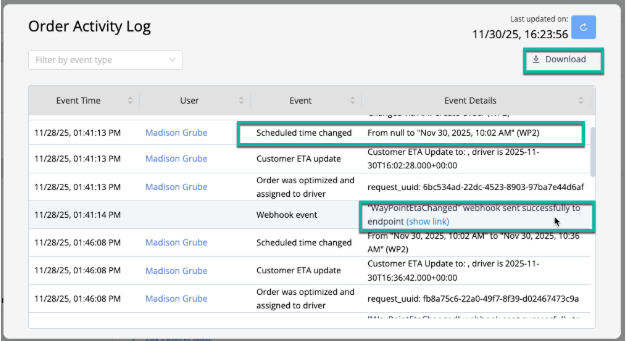
The Activity Log now tracks more order updates, including Custom Attribute changes from external systems and waypoint additions or removals. It also supports full event downloads and easier multi-select filtering. These improvements work together to give users a clearer and more complete picture of how an order changed over time—whether the update came from an automation, an external tool, or a manual action.
In practice, this helps teams understand what changed, when it changed, and why—reducing investigation time and providing more reliable data for downstream workflows.
extended time-based attribute triggers
Automations can now run a set number of hours after an attribute changes, with full support for 24-hour logic. This provides more flexibility and control for time-driven workflows.
Teams can now automate follow-ups that previously required manual reminders, such as initiating customer communication if no progress has been made within a defined timeframe.
.png)