Meetups: assign task across multiple routes and keep them connected
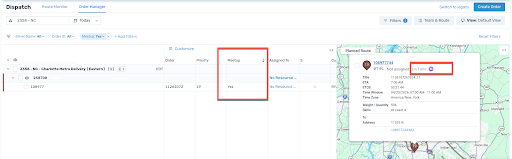
Meetups is a capability meant to support deliveries where work needs to be split into separate tasks across different routes. Without this, teams need to manually coordinate between routes and tasks can lose connection during planning and execution.
It allows tasks from the same order to be assigned to different routes based on capacity and skills. It also keeps these tasks connected by showing clear links and indicators in Order Manager, Route Manager, the map, timeline, and order page.
This reduces manual coordination, makes it easier to manage deliveries that require additional support, and helps ensure that all related tasks stay connected throughout planning and execution.
Questionnaire: collect and share structured delivery data
Merchants often need additional delivery details such as address type, access instructions, or special requirements to plan and complete deliveries successfully.
Today, this information is typically gathered through manual follow-ups like calls or emails, which adds operational overhead and increases the risk of miscommunication.
As a result, both dispatchers and drivers may lack the information they need upfront, leading to inefficiencies and delivery issues.
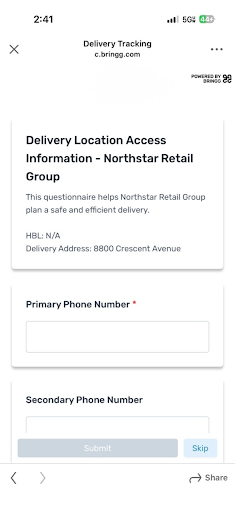
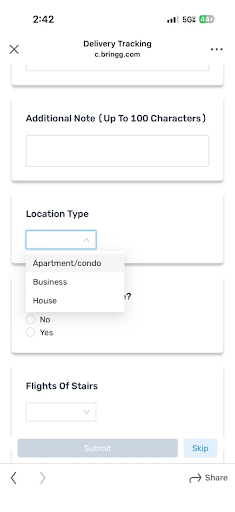
Bringg’s questionnaire product solves this by enabling teams to capture structured delivery information throughout the entire delivery flow.
Questionnaires can be created once and reused across workflows, with data collected during checkout or operations and shared across systems via webhooks.
The captured questions and answers are also displayed directly within the task as attachments, making them easily accessible to both dispatchers and drivers. This ensures that accurate, consistent information is available when it is needed, improving planning, execution, and overall delivery outcomes.
Company attribute: separate data and workflows
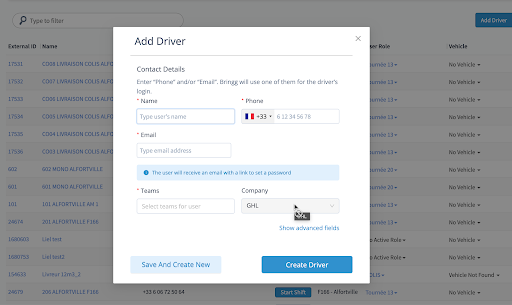
The Company attribute has been enhanced to support clear data separation across subcontractors and teams.
Dispatchers assigned to a company can now only view and manage drivers, vehicles, and resources that belong to their own company if necessary (based on privileges). Company assignment is required and applied automatically when creating new resources, preventing cross-company access or edits.
This helps streamline operations, reduce errors, and protect data across different organizations.
Dispatch & Planning v2 updates - Team Aggregation
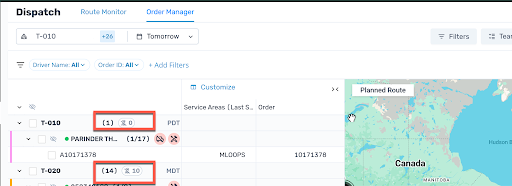
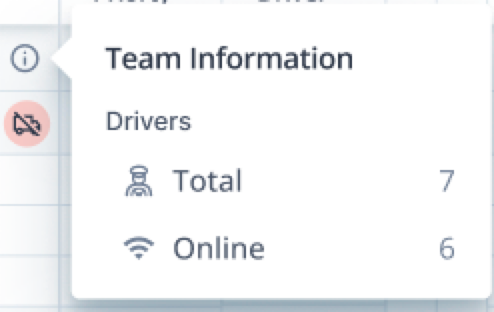
Team aggregation is a capability that provides real-time visibility into fulfillment status and driver capacity at the team level. It uses aggregated statistics to show unassigned orders out of total orders, along with online drivers out of total drivers and those with assigned work.
A summary row shows this data and updates based on the selected Group By setting within Order Manager.
This helps dispatchers find unassigned orders faster, use the summary view instead of exporting data, and clearly see how many drivers are available and working, so they can make quicker and more accurate decisions.
Tag-specific cancellation reasons
We’ve improved the driver cancellation experience by making cancellation reasons more relevant to each order. Drivers will now see reason options that align with the specific type of order they are handling, helping ensure more accurate selections and better data quality.
If an order includes a tag, only applicable reasons will be shown; otherwise, standard merchant reasons will be used.
This enhancement supports better Last Mile Performance by improving both data accuracy and operational execution.
More Accurate Cancellation Data
By guiding drivers to select only relevant, structured reasons, teams gain cleaner and more actionable insights into why deliveries fail. This makes it easier to identify common issues, reduce repeat failures, and improve first-attempt success rates.
Reduced Operational Errors
Limiting cancellation options to valid, context-specific reasons helps prevent incorrect selections that can trigger the wrong workflows or impact KPIs. This ensures the right downstream actions are taken and improves overall delivery efficiency.
Security settings: Advanced Email Domain Security Controls
Control Your Access
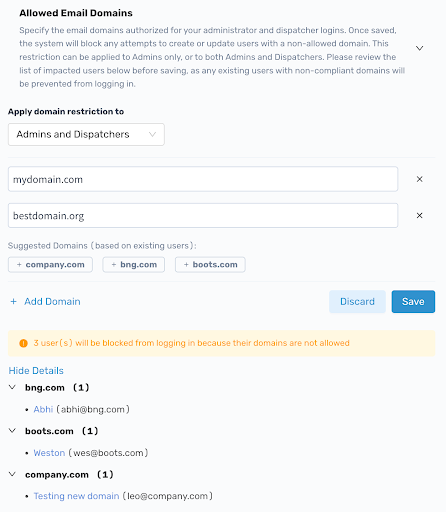
We are introducing a powerful new security configuration within your Merchant Configuration > Security. You can now enforce a precise "whitelist" of approved email domains for all your administrator and dispatcher accounts.
This acts as a robust barrier, preventing unauthorized personal emails (e.g., @gmail.com or @competitor.com) from accessing your sensitive dashboard data.
Key Features:
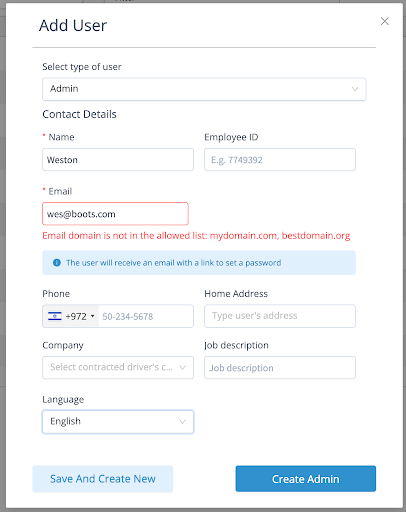
Domain Validation on Creation & Update: Once configured, our system will automatically block any attempts to create a new user or update an existing user with a non-allowed email domain.
Existing User Login Blocking: Any existing user with a non-compliant email domain will be unable to log in.
Proactive User Audit: Before activating, use our real-time audit list to identify any existing users who fall outside of your new rules, so you can resolve access issues without locked accounts.
One-Click Setup with Suggested Domains: Get started instantly! We automatically suggest common domains already in use for a streamlined one-click setup.
Granular Control: You decide! Apply this whitelist to Admins only, or to both Admins and Dispatchers.
Password Rotation Policy for Merchant Users
To strengthen account security and meet compliance requirements, Bringg now enforces periodic password rotation for Admin and Dispatcher users.
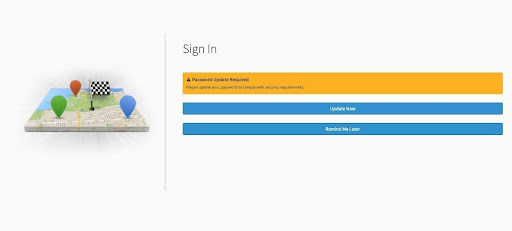
Passwords expire after a set number of days based on the account's two-factor authentication status, at which point users are prompted to update their password at login.
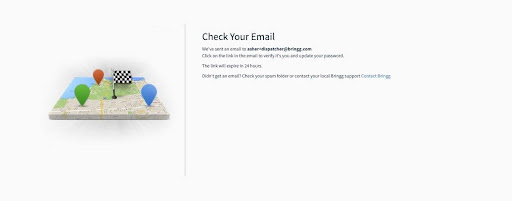
Users who are not ready to update immediately can defer up to three times before a mandatory reset is enforced. Reminder emails are sent in the days leading up to expiry to give users advance notice.
Carrier Exception Mapping and Automation
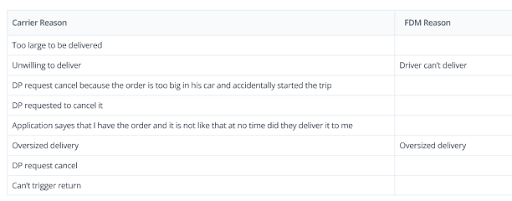
You can now fully understand and standardize why external carriers cancel orders. With the new Cancellation Reason Mapping capability, carrier-specific cancellation codes are automatically translated into your own predefined merchant reason codes. Both the original carrier reason and the mapped reason are logged in the activity log and exposed via webhooks, ensuring consistent, clean reporting across all carriers. This removes the need for manual mapping or external documentation, making it much easier to track trends, analyze root causes, and monitor SLAs.
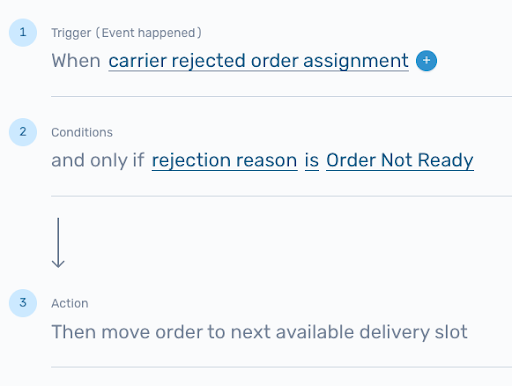
Building on this, we’re introducing reason-driven exception handling for pickup rejections. Carrier-specific rejection reasons are consolidated and mapped into your standardized merchant reasons, allowing you to configure workflows once and apply them across all carriers. New triggers and conditions in Automation Center let you define precise actions based on the mapped reason - for example, automatically canceling orders for oversized items, retrying with an alternative carrier when capacity issues arise, or routing orders for manual review when constraints are unmet. The result is less manual intervention, more consistent reporting, and more accurate real-time updates via webhooks.
Cancellation mapping is already available. Pickup rejection mapping will roll out in the coming weeks - reach out to your Bringg representative to enable these capabilities.