Smarter POD Validation
Merchants rely on POD photos to verify successful deliveries and investigate customer disputes, but carrier-uploaded images often vary greatly in quality and relevance. In many cases, images fail to clearly prove that a delivery was completed, forcing merchants to absorb refund costs because they cannot confidently challenge customer claims.
AI-powered POD quality validation is being introduced to help determine whether uploaded images meet operational delivery requirements - such as showing the tamper seal and customer’s door - or contain unusable content like blurry photos, carrier vehicles, or unrelated scenery. Validation scores and tags will be stored at both the POD and task level, helping merchants investigate disputes more effectively while improving visibility into carrier-level delivery quality trends.
Customize Webhook Authentication and Scheduled Report Sharing
Connecting Bringg webhooks to systems that require extra authentication parameters or custom headers used to mean workarounds or support tickets.
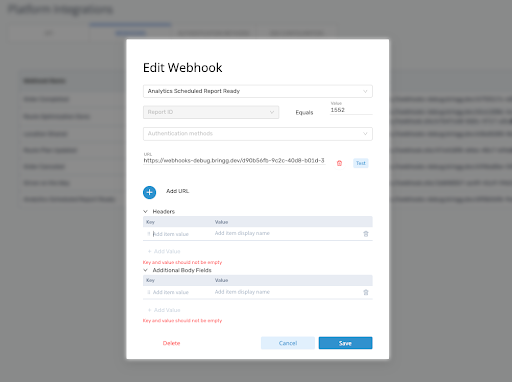
Now you can add custom body fields to your OAuth 2.0 authentication requests , such as the audience parameter required by some identity providers- choose whether your Client ID and Client Secret are sent in the request headers or body, and include additional body fields in the webhook payload itself.
Sharing scheduled analytics reports is now fully self-service too. When you schedule a report with the Webhook export method, you can select an existing report sharing webhook or create one on the spot by entering a URL.
The new Analytics Scheduled Report Ready webhook then appears under Platform Integrations → Webhooks like any other webhook, where you can manage its headers, body fields, and authentication yourself.
Existing scheduled reports shared via webhook will be migrated automatically to the new webhook type, with no change to current behavior.
DPV2 Enhancements
Smarter Map Clustering
Dispatchers often struggle to identify and monitor orders in dense delivery areas when clusters remain grouped too aggressively or route visibility changes during live operations.
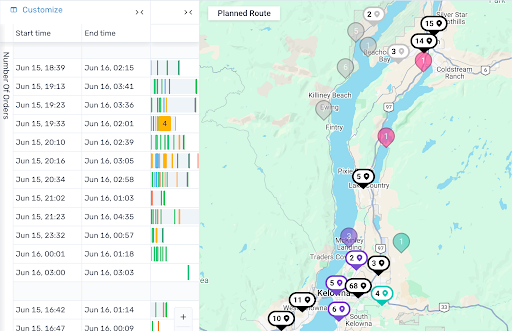
Map clustering behavior is being enhanced to improve how clusters separate during zooming, maintain visibility for selected orders, and provide clearer operational indicators directly within cluster views.
Route colors will also remain consistent during filtering, sorting, and navigation between Planning, Dispatch, and Route Monitor views.
These enhancements reduce manual map interaction while improving real-time route monitoring and operational visibility.
Route Visibility Enhancements
Route visibility across DPV2 is becoming more consistent during live operations. Route colors now remain stable during filtering, sorting, and navigation between Planning, Dispatch, and Route Monitor views, reducing confusion during real-time monitoring. Additional visibility improvements also include clearer route start and end time indicators and optional manual route color adjustments.
Print Schedules and Receipts
Dispatchers and warehouse teams still rely on printed schedules and receipts for operational workflows such as route preparation, delivery validation, driver briefings, and dispute handling. Many of these capabilities currently exist only in legacy workflows.
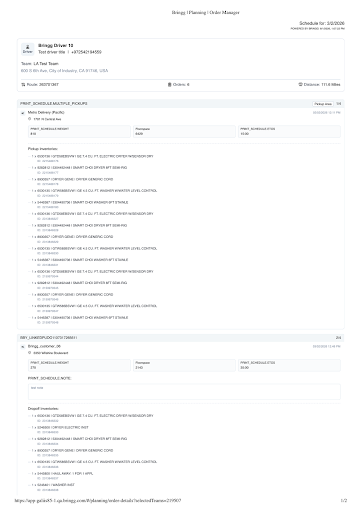
Print Schedule and Print Receipt functionality are now being added directly into DPV2, allowing users to generate and download PDFs.
These enhancements also improve receipt retrieval through a dedicated webhook, before PII masking occurs after the 45-day retention window, reducing reliance on manual downloads and partial proof-of-delivery retrieval workflows.
Faster Unassignment Workflows
Dispatchers frequently need to unassign drivers, vehicles, trailers, or orders during live operations, but these actions currently require navigating through multiple assignment screens before an unassign option becomes available.
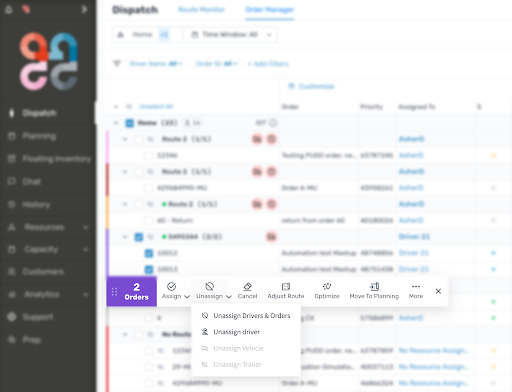
DPV2 now includes a dedicated Unassign dropdown directly within the action bar, giving dispatchers quick access to common unassignment actions without opening assignment modals.
Assignment and vehicle assignment actions have also been consolidated into a single Assign dropdown, reducing interface clutter and streamlining high-frequency dispatch workflows.
These enhancements help dispatchers make route adjustments more quickly during live planning and execution.
Custom Labels and Translations
Operational terminology often differs across merchants, regions, and internal systems, creating inconsistencies in planning and dispatch workflows.
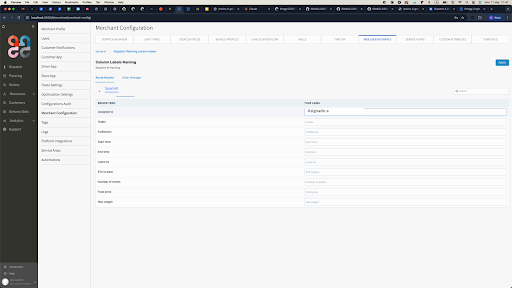
Planning and Dispatch Details views now support configurable column labels and translation management across supported languages. Admins can customize display names for operational fields and maintain more consistent terminology across teams and workflows.
These enhancements reduce reliance on manual workarounds while improving operational clarity across global deployments.
Delivery Blocks Utilization Visibility For Dynamic Delivery Slots
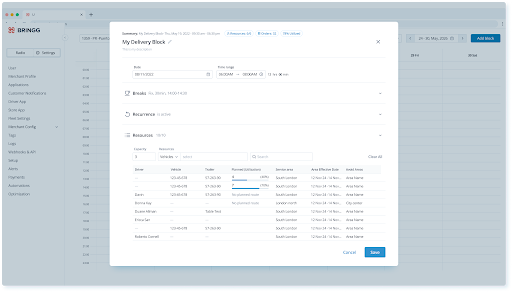
When dispatchers or planners make manual changes to delivery blocks: reassigning orders, adjusting time slots, or modifying routes, understanding the downstream impact on driver capacity is critical to avoiding SLA breaches.
Dispatchers can now see real-time utilization data directly within delivery blocks, including the number of orders assigned to each resource and their utilization percentage, as well as aggregate order count and overall utilization across the entire delivery block.
A Route Planner shortcut is also accessible from the calendar view, making it faster to open and review the plan for any given day. This is visible to Dynamic Delivery Slots users only.
Self-Service Reserve Capacity Configuration by Day of the Week
Reserve capacity thresholds which hold back a portion of delivery capacity as orders approach their cutoff window, were previously fixed at a single value applied uniformly across every day of the week.
Operations teams can now configure these thresholds directly and set different values per day, allowing peak days to retain more capacity while quieter days release availability earlier.
Authorized users can manage these settings at both the merchant and team level, giving teams precise control over how delivery capacity is made available to incoming orders throughout the week.
Delivery Slots: Streamlined Management and Deeper Capacity Visibility
Managing delivery slots across a busy operation has historically required editing each slot one by one, creating unnecessary overhead when dozens of slots share the same update.
Dispatchers can now select multiple delivery slots, individually or by full day, and apply changes to cutoff, service plan, service area, or effective dates in a single action, with the option to apply updates temporarily or on an ongoing basis. Filtering slots by time period, service plan, or service area makes it easy to target the right group before editing.
Blackout management is similarly streamlined, with operations teams now able to export and bulk-upload blackouts via CSV to handle recurring events without manual entry.
Each delivery slot now displays a detailed capacity breakdown across time, weight, handling units, and order count, giving dispatchers clearer data for resourcing decisions. Admins can also assign separate view and edit privileges for delivery slots and blackouts, allowing read-only access for some dispatchers while preserving full edit rights for others.
Menu and privileges
Redesigned Navigation and Granular Access Controls for Dispatcher Management.
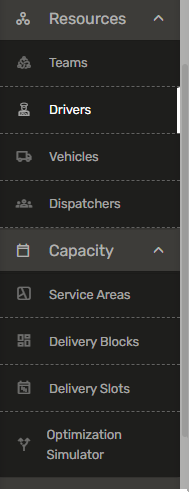
The main menu has been redesigned to better reflect operational workflows: a new Capacity section brings together planning tools: Delivery Blocks, Delivery Slots, Service Areas, and the Optimization Simulator, in one place. A dedicated Dispatchers page is now accessible under Resources.
Access controls for Teams, dispatcher profiles, and driver profiles have moved from simple on/off toggles to three-tier permissions: None, View Only, and Edit, giving admins precise control over what each role can see and change.
New "Add Team" and "Add Dispatcher" privileges let non-admin dispatchers create teams and dispatcher accounts independently from their view or edit access. Existing settings are automatically migrated: dispatchers currently with Teams Menu access will move to View Only, with no manual reconfiguration needed.
Expanded Capacity Planning Options
Delivery demand often fluctuates throughout the week, but reserve capacity settings have been managed through a single configuration applied across all days. Operations teams can now configure reserve capacity thresholds themselves by day of the week, giving them greater control over delivery slot availability based on expected demand patterns.
These enhancements help teams better manage peak periods, balance incoming order volume with operational capacity, and make more informed planning decisions throughout the week.
Driver Workflow Enhancements
Return-to-Base Navigation
Drivers using external navigation apps can be routed back to incorrect locations at the end of a route when navigation defaults to the team address instead of the actual operational return location.
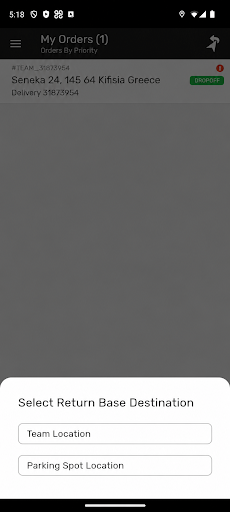
Navigation behavior is now being aligned with delivery block configuration and parking spot logic. Drivers are guided toward the configured route end location, while multi-destination scenarios allow drivers to choose their preferred return location directly from the Driver App.
These enhancements improve navigation accuracy and create better alignment between planning and route execution.
Store Contact Details
Customers often receive centralized support contact details even when deliveries are fulfilled by specific stores or warehouses, creating delays and operational confusion during delivery coordination.
Customer communications and tracking experiences can now surface the correct store or warehouse phone number and email directly from order data or fulfillment location identifiers.
These enhancements improve communication accuracy while helping customers reach the correct operational location more quickly.
Smarter Communication Templates
Merchants managing large delivery operations often require more accurate and automated fulfillment data across customer communication workflows.
Email templates are now being enhanced to support a more dynamic fulfillment data population across customer communications and tracking experiences.
These enhancements reduce manual configuration while improving consistency across delivery notifications and operational support workflows.
Platform and Automation Enhancements
Automation Time Window Controls
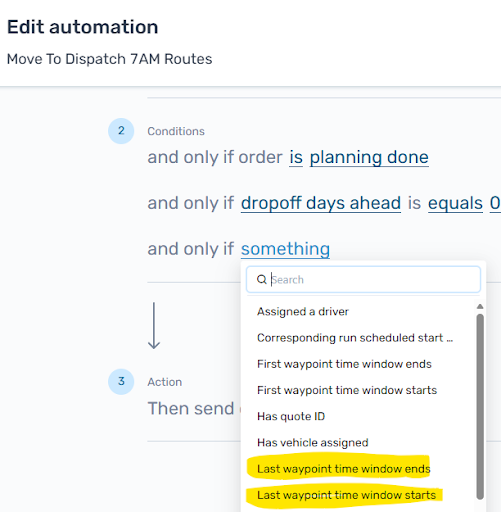
Automation workflows are being enhanced with more flexible time-based conditions, allowing teams to trigger automations only within defined operational time windows or recurring intervals such as every X minutes, hours, or days.
This helps prevent orders from being dispatched too early while improving support for operational workflows that rely on recurring scheduling logic throughout the day.
These enhancements also reduce the need for multiple repetitive automation rules while maintaining compatibility with existing automation configurations.
Flexible Carrier Field Mapping
Carrier integrations are becoming more flexible by allowing teams to customize how order and delivery identifiers are mapped between operational systems and third-party carriers. This reduces the need for customer-specific development work while helping implementation teams support more complex operational and carrier requirements more quickly.
Default mappings will still remain available, while configurable field mapping support also improves compatibility with carrier-specific API fields and custom operational attributes.